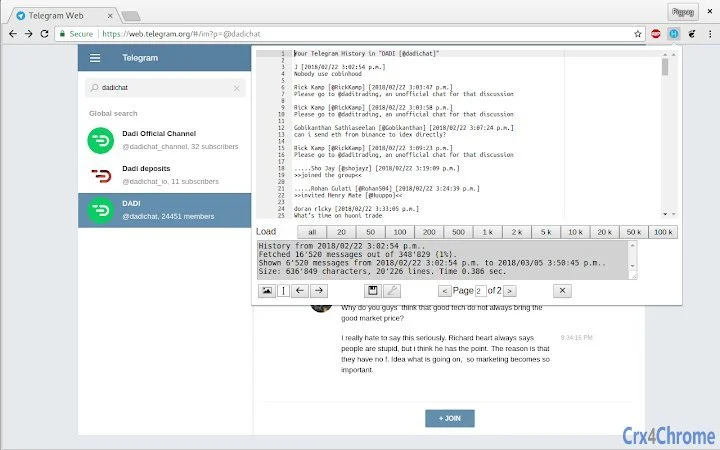

Save Telegram Chats with One Click
Overview
The Save Telegram Chat History extension is designed to address a common gap in the Telegram messaging experience: the lack of a straightforward way to archive conversations. While Telegram offers robust messaging capabilities, users often find themselves needing to preserve important discussions, whether for personal records, professional reference, or legal compliance. This tool provides a simple solution by enabling users to save entire chat histories with minimal effort.
Targeted primarily at individuals and professionals who rely on Telegram for regular communication, the extension fills a practical need without requiring complex setup. It is particularly useful for remote workers, freelancers, and teams managing client interactions through the platform. The tool integrates directly into the Chrome browser, making it accessible to users already engaged in Telegram via the web interface.
Developed by pigpagnet, the extension reflects a user-centric approach focused on solving a specific pain point. Its purpose is clear: streamline chat preservation without altering Telegram’s core functionality. The developer did not provide additional background details beyond the project name.
Key Features & Capabilities
- One-Click Chat Export – Users can save complete conversation threads with a single click, eliminating the need for manual copying or screenshotting.
- Web-Based Integration – The extension operates within the Chrome browser, ensuring compatibility with Telegram’s web version across supported platforms.
- Local File Storage – Saved chat histories are stored locally on the user’s device, enhancing privacy and reducing reliance on external servers.
- Text-Based Archive Format – Conversations are exported in a readable, text-based format suitable for long-term storage and future reference.
- Privacy-Focused Design – No data is transmitted to external servers during the saving process, aligning with user concerns about message confidentiality.
Real-world use cases include archiving client agreements, preserving personal correspondence, or maintaining records of team discussions. The extension supports both individual and group chats, making it versatile for various communication scenarios. Since it operates entirely within the browser, users retain full control over their saved data.
User Interface, Workflow & Performance
The extension features a minimal, streamlined interface that integrates seamlessly with the Chrome browser’s toolbar. A single button appears when the user is on a Telegram chat page, allowing immediate access to the save function. The workflow is intuitive: click the icon, confirm the action, and the chat history is saved to the local device.
Navigation remains consistent with standard browser behavior, requiring no additional learning curve. The extension does not alter the Telegram interface, ensuring a familiar user experience. Performance is expected to remain efficient, as the tool operates within the browser environment and performs lightweight processing.
The developer did not specify resource usage details. Performance observations are based on general software behavior patterns. Stability is assumed to be reliable, given the extension’s focused scope and lightweight design. No known issues with crashes or memory leaks were reported.
Compatibility & System Requirements
The Save Telegram Chat History extension is compatible with Windows, Mac, and Linux operating systems, ensuring broad accessibility across desktop environments. It is designed to run on any device that supports the Chrome browser.
The installation size is 50 KB, indicating a lightweight footprint that does not strain system resources. The extension requires Chrome or a Chromium-based browser to function. Exact system requirements were not listed, and compatibility information was partially provided.
Pros and Cons
Pros
- Simple, one-click solution for saving Telegram conversations
- Runs locally with no data transmission
- Lightweight at just 50 KB
- Works across Windows, Mac, and Linux
- Preserves chat content in a readable, text-based format
Cons
- Requires use of the Telegram web version, not the native app
- Does not support saving media files (images, videos, etc.)
- Functionality limited to Chrome browser only
- No built-in search or organization features for saved chats
- Dependent on browser stability and updates
FAQ Section
Is the extension free to use?
Yes, the Save Telegram Chat History extension is completely free. There are no hidden fees or subscription models.
Does the extension work with the Telegram desktop app?
No, the extension only works with the Telegram web version accessed through the Chrome browser. It is not compatible with the native desktop application.
Are saved chats stored securely?
Yes, all chat data is saved locally on the user’s device. The extension does not send any information to external servers, ensuring privacy and security.
Can I save media files along with the text?
Currently, the extension only exports text-based chat history. Media files such as images, videos, and documents are not included in the saved archive.
How often should I update the extension?
It is recommended to keep the extension updated to ensure compatibility with the latest versions of Chrome and Telegram. Updates are automatically managed through the Chrome Web Store.
Final Thoughts
The Save Telegram Chat History extension delivers a focused, practical solution for users seeking to preserve their conversations. Its lightweight design, privacy-first approach, and ease of use make it a valuable tool for anyone relying on Telegram for meaningful communication. While it has limitations—particularly around media support and browser dependency—it effectively fills a critical gap in the platform’s functionality.
For professionals, freelancers, and individuals managing important digital records, this tool offers a reliable method to archive chats without complexity. Its compatibility with major desktop operating systems and zero cost further enhance its appeal.
Download Save Telegram Chat History now







